
Traffic Court Records in Presque Isle County
Presque Isle County sends traffic matters to the 89th District Court. That court posts a traffic division of its own. A city name like Rogers City or Onaway on a ticket does not mean a city court holds the record. No separate municipal court docket exists for either city. The district court is the route. A traffic court record can hold the ticket or case number, issue date, alleged violation, court, setting, plea or other response, amount due, and disposition. What you actually see depends on the court and public access. The record covers the citation proceeding only, not a driver's whole motor-vehicle history.
Presque Isle County Traffic PayTix Lookup
Michigan's District Court PayTix search opens with county and court selectors. It offers four lookup methods: last name with ticket number, last name with date of birth, driver-license number with state, or license-plate number with state. Each method exists to locate a ticket. None of them makes PayTix a full court-history search.
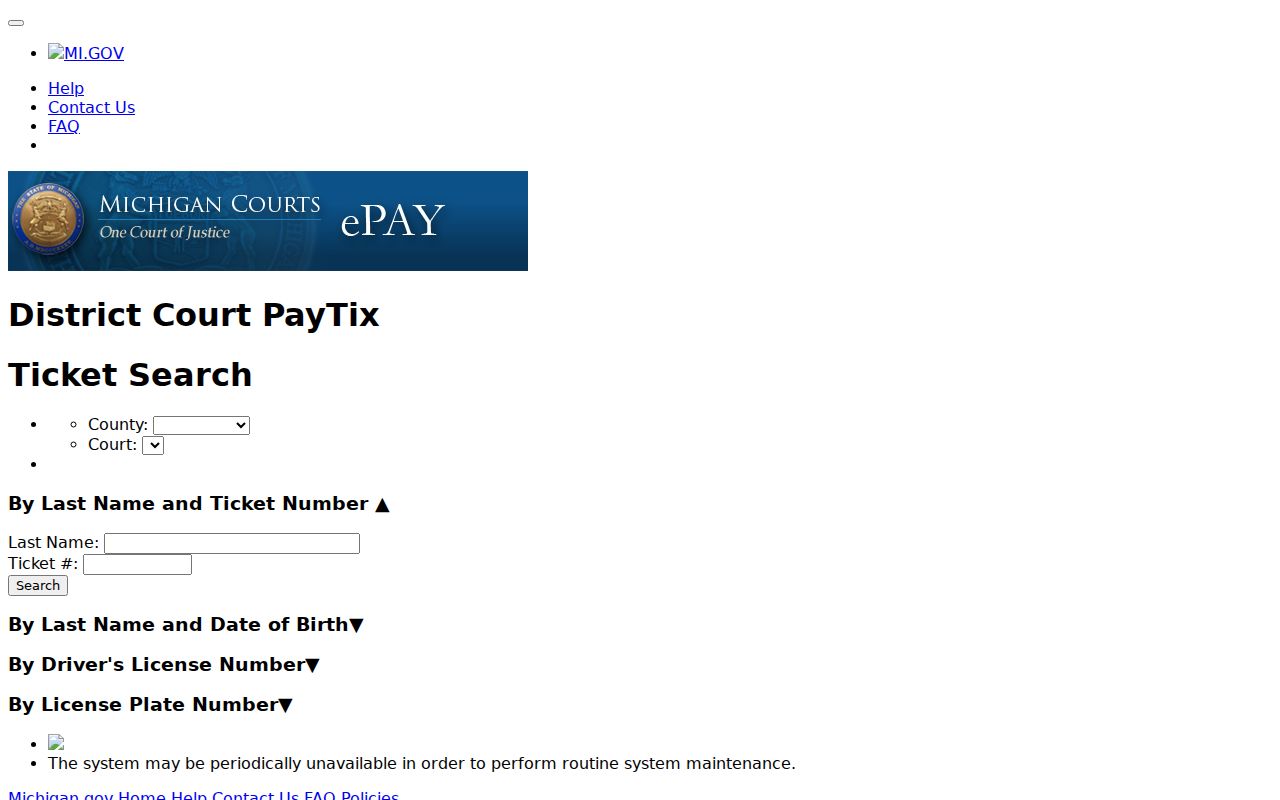
Pick the County and Court from the dropdowns. Then confirm your court and ticket show up. If Presque Isle 89th does not appear, call the 89th District Court directly. The same applies if your ticket will not come up. Not every local citation can be found or paid online. Assume nothing about availability until the court tells you.
How to Look Up a Traffic Ticket
Begin with what the ticket itself prints. The court named on the citation tells you where the record sits. PayTix shows limited ticket and payment details when the court participates. Meanwhile, MiCOURT and the court's own calendar and case pages handle public docket and date questions. The county calendar hub adds a link to the official district court site. That is one more channel.
- Read the ticket for its number, court, response date, and any case number.
- In PayTix, select County and Court, then use the available ticket, name and date-of-birth, license, or plate method.
- For public case-history questions, try MiCOURT or the 89th District Court's calendar/cases portal and confirm the county.
- If the ticket is not found, call 989-734-2411 or visit the district court counter at 151 E. Huron Avenue, P.O. Box 110, Rogers City, MI 49779.
- Use the date printed on the ticket or court notice as the controlling response date unless the court gives updated instructions.
Note: The district court can explain its court-selection, appearance, and payment options. A portal result never replaces a court notice.
Presque Isle County Traffic PayTix Fields
The official PayTix result layout lists Ticket #, Name, License Plate #/State, Issue Date, Violation, and Amount, plus a selection checkbox and an Add To Cart control. Those fields can match a ticket to the right court. They cannot trace every event in the docket.
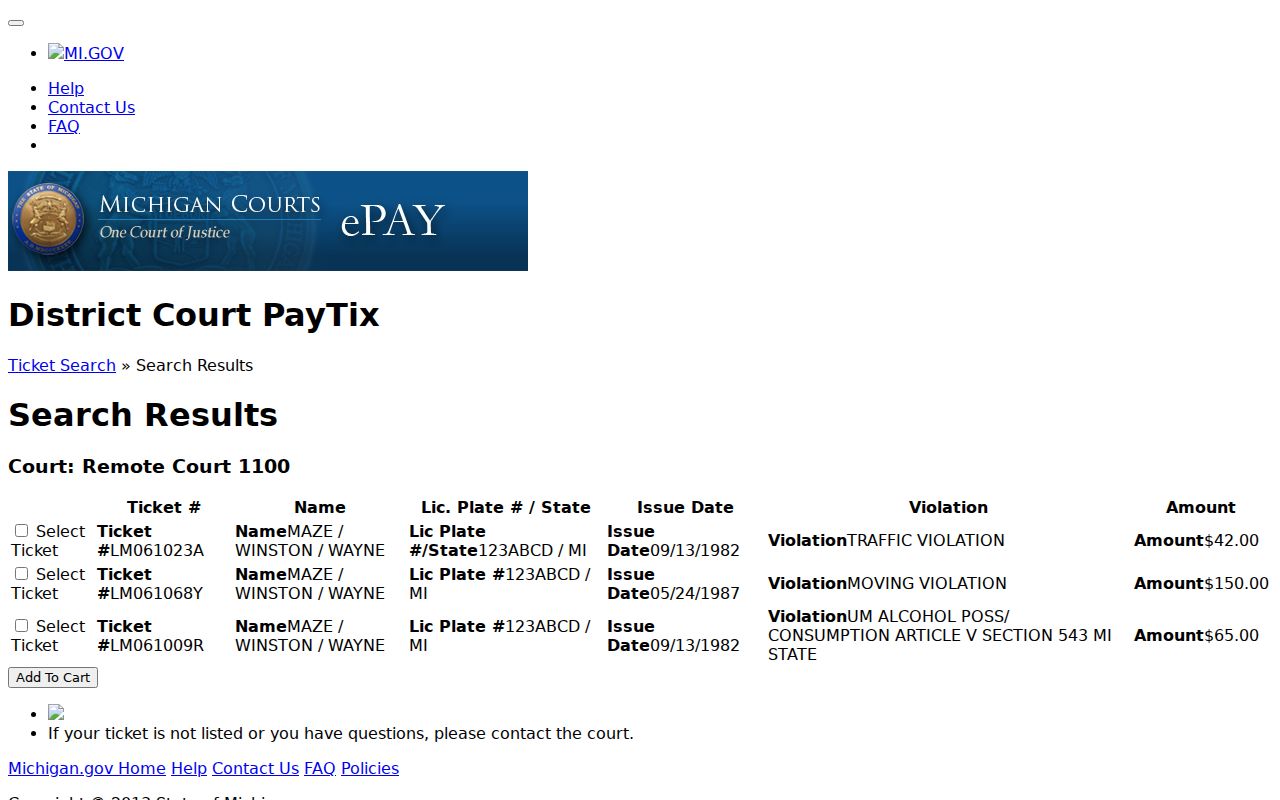
That result screen serves payment and search. For a hearing, a filing, a disposition, or a certified record, ask the clerk for the court docket copy.
| PayTix field or control | What it can help identify | What it does not establish |
|---|---|---|
| Ticket # and issue date | The citation to match with the court | The complete court case history |
| Violation and amount | The displayed ticket information | A final court disposition |
| Cart control | Available payment workflow | That payment access extends a date |
Finding Your Traffic Court Date
Read the citation first. Then compare it against the newest information the court has posted. The public 89th District calendar and cases portal, plus a MiCOURT display where available, are the current channels. A calendar lists scheduled settings, though, not a full case history. If a date seems to have moved, trust the newest court entry or notice over an old calendar page or search result.
| Citation or case number | Use the identifier exactly as printed, such as TICKET-123456; the research does not confirm one local numbering pattern. |
|---|---|
| Court | For local traffic matters, confirm the 89th District Court and Presque Isle County in the result. |
| Date and time | The appearance, arraignment, or other setting shown on the current court information. |
| Room or location | A calendar may supply a room field; confirm it with the court if it matters for attendance. |
| Status | A pending, paid, or other displayed status is not by itself a full disposition record. |
Presque Isle County Traffic Date Limits
PayTix warns that some Michigan district courts take credit-card payments for civil infractions and misdemeanor cases. But that convenience does not move a ticket date. If your ticket or court is missing online, you must still answer by the date printed on the ticket or court notice. Presque Isle County posts no grace period, universal rescheduling rule, plea-by-mail process, or deferred disposition instruction. So do not assume one exists. Call the 89th District Court for the current instruction. A portal outage, an old webpage, or a guessed option counts for nothing. That matters most when a calendar and a ticket point to different dates.
Presque Isle County Traffic History Limits
A PayTix result can name the citation, violation, issue date, and amount. It still is not the full Presque Isle traffic court docket. For a hearing, filing, or disposition question, use the court's public case channel or ask the 89th District Court which record it releases.
Paying or Contesting a Ticket
The citation and the court's instructions control your choices. PayTix may pay some civil infractions and misdemeanor cases at participating district courts, but it cannot promise a given Presque Isle ticket is payable online, and it never overrides a court instruction on appearing or responding. Ask the 89th District Court what options attach to your actual ticket.
| Pay through an available court channel | Seek a court response or hearing |
|---|---|
| Use only the payment method and amount displayed or confirmed for that ticket. | Follow the ticket or court notice and ask the court for its current procedure. |
| Keep the court's payment confirmation and check the case history if a docket question remains. | Confirm the court, date, time, and any current setting directly with the district court. |
| Portal availability does not alter the date on the ticket or notice. | Do not assume a local plea-by-mail or deferred option without court instructions. |
Do not let a portal problem change the date. The statewide PayTix notice says inability to use the website does not release a person from answering by the citation's due date. Contact the 89th District Court promptly at 989-734-2411 if the court selector or ticket cannot be found.
Presque Isle County Traffic City Routing
Rogers City and Onaway have no municipal court of their own. A traffic ticket from either city lands in the 89th District Court. That court serves the whole Presque Isle County area along with the shared district. Before you rely on PayTix, confirm the court selector. Then check any result against both the county and the district-court context. For Onaway in particular, the city offers no traffic-payment or municipal-court portal. So PayTix is the first stop and the 89th is the fallback. Rogers City's 2014 code compilation includes a parking-violations-bureau provision. It states plainly that nobody has to dispose of a parking violation through the bureau. The matter can go before a court with jurisdiction instead. That compilation is dated, though. Verify the current ordinance and the court route. Do not treat the old wording as today's procedure.
Court Traffic Record vs Driver Record
Two files, two keepers. The traffic court record is the 89th District Court's case record for the citation and everything the court process did with it. A state driving record is a different animal. The state licensing agency maintains that one, and it sits outside this county court-record lookup. The PayTix search fields simply help you locate a ticket within that system.
| Question | Court traffic record | State driving record |
|---|---|---|
| Custodian | 89th District Court clerk staff for the court case. | The state licensing agency, not the court clerk. |
| Focus | Citation, court setting, filings, and court disposition as publicly available. | A separate state-administered file, not covered by this court-record page. |
| County route | PayTix, court portal, court counter, or clerk inquiry as appropriate. | Not a substitute for a traffic court docket search. |
Presque Isle County Traffic Copy Requests
A PayTix result is not a certified court record. It is a screen, not paper. For a public copy, identify the 89th District Court, the case or ticket number, and the exact document or case-history item you want. The district court answers calls at 989-734-2411, faxes at 989-734-3400, and takes email at dist89th@picounty.org. Ask the clerk about copying and accepted payment methods. Michigan court-record access is governed by MCR 8.119, not the county FOIA route for judicial case files. Some information stays protected. A rule, a statute, or a court order can set that limit, and a clerk can identify the public channel without changing it.
Fees and Copies
Copy guidance comes from the county-posted court fee schedule. Record copies cost $1 per page. A certified copy runs $10 for certification plus $1 per page. The County Clerk Services schedule uses near-identical wording. It lists $10 for the first page and $1 for each additional page of a certified court record. Confirm the current fee, document type, certification need, and payment method with the 89th before you order.
| Traffic court record item | County-posted fee guidance | Confirmation point |
|---|---|---|
| Record copy | $1 per page | Confirm the court holds the requested public item. |
| Certified copy | $10 certification plus $1 per page, or $10 first page plus $1 additional under the related clerk schedule | Ask which schedule line applies. |
| Ticket payment | Amount depends on the ticket and court channel | Do not substitute a copy fee table for an amount due on a citation. |
Note: A court may need the case or ticket number before it can determine availability, page count, certification, and the exact fee.
Presque Isle County Traffic Record Terms
Plain labels make the case record easier to read. An issue date is simple. It is the date printed for the citation. An appearance date is the court-related date stated by the ticket or by the court. A violation is the allegation shown in the ticket record. The amount is just the displayed figure, not a complete case history.
- Civil infraction
- A traffic matter described by the court or ticket under the civil-infraction process.
- Misdemeanor traffic case
- A traffic-related criminal matter handled in the district court's criminal process.
- Setting
- A date placed on the court calendar; it is not proof that the event occurred.
- Disposition
- The court's outcome or closure status, which requires the court record for full context.
Need a countywide court date rather than a single citation result? The court calendar lays out the separate calendar channels Presque Isle courts use.